The COVID-19 pandemic has accelerated the adoption of online purchases among more consumers in Singapore. To stay competitive, businesses must prioritise their digital transformation by offering a safe and trusted digital payment solution that enhances customers online buying experience.
One digital payment solution that is synonymous with the e-commerce world is PayPal. Founded in 1998 as the first digital payment platform to send and receive payments, it has grown to process 22.3 billion payment transactions worth US$1.36 trillion in payment volume in 2022 from over 435 million active consumer and merchant accounts.
Whether you’re pivoting your business online or looking to expand your business operations internationally, this guide will explain how a PayPal Business Account can benefit your business and the steps to setup one.
Why A Business PayPal Account Benefits Your Business
Whether you are targeting a local or international audience, you need to be able to receive payments from your customers on your preferred digital front, such as a website or mobile app.
Having PayPal as one of the payment options gives more convenience and confidence to your online visitors. In addition to its longstanding status as a payment solution, PayPal allows users to send payments without the need to disclose sensitive financial details like their credit card or bank account number to the payee.
According to research by Ipsos in 2018, consumers are 54% more willing to buy in newer or unfamiliar situations when a business accepts PayPal. On the other hand, the same research reported that 59% of people had abandoned a transaction when PayPal wasn’t offered as a choice. Having a familiar and trusted payment method would increase buyer confidence and potentially increase sales for businesses.
Read Also: How To Set Up WhatsApp In-Chat Payments Feature In Singapore
Able To Accept Payments From Over 200 Countries
With PayPal, you can target customers from around the world, as you would be able to connect with over 340 million PayPal customers in over 200 countries. PayPal allows them to conveniently make online payments using debit or credit cards, as well as other popular payment options that they wish.
As a business, you can receive payments in the currencies of up to 21 other countries without converting them into your primary currency by adding the currency that you accept in your wallet.
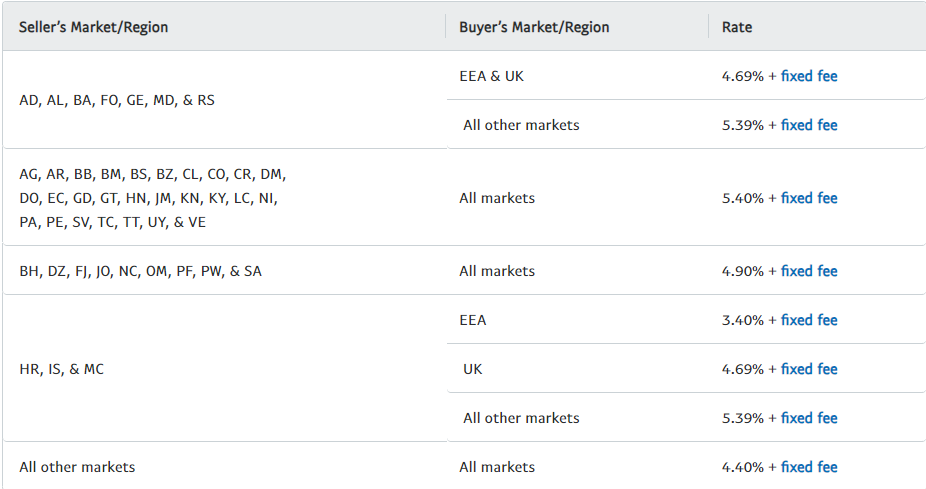
The charges on each differ based on the receipt’s address and currency of payment. For example, for a local (Singapore) customer paying in Singapore dollars, a business may incur a charge of 3.90%+$0.50 (fixed fee). On the other hand, if a transaction is carried by a customer in the United States in US dollars, the business may incur a charge of 4.40%+US$0.30 (fixed fee). Check out the current fixed fees here.
Standard Rates For Domestic Transactions

Rates For International Transactions
Create Customised Payment Options
Some businesses may require different types of billing or payment options other than a one-off direct payment option. With PayPal Business Tools, you can customise whether you like to setup the standard PayPal integration or opt for advanced payment processing, depending on your business needs. You also have the option to set up a recurring or subscription payment option if your business requires it.
Furthermore, there is also an option to create professional, customisable invoices to make it easier to bill your customers.
Make Payments To Contractors Directly
In addition to receiving payments, you can also pay your vendors for the goods and services easily and directly using your PayPal account. Similarly, you can also set up payouts to multiple contractors at the same time in 24 currencies across over 180 markets with PayPal handling the currency conversion.
Read Also: Guide To Expanding Your Singapore Based E-commerce Business Overseas
Sell With Confidence With PayPal’s Fraud Protection
Amidst the rise in online scams, businesses selling online need to be cautious against fraudulent activities. Recognising this threat, PayPal continuously tracks all transactions to help prevent fraud and other scams, such as phishing and identity theft. Leveraging its extensive intelligence from its two-sided network with advanced machine learning, it can adapt to your business and minimise chargebacks, ensuring you maintain good customer relationships.
Resolve Disputes With Customers Easily
As you sell internationally, there will be occasions where customers or vendors may raise disputes against your services or products. With PayPal’s resolution centre, you can easily resolve any disputes raised from the account dashboard, which enables you to view, manage, and settle disputes with your buyers from around the world.
Track And Monitor Sales Performance
Once you start selling, you will want to start tracking and monitoring your sales that are coming through PayPal. This can be easily done using PayPal Business tools that allow you to use shopper data and insights to create targeted marketing campaigns for effective use of advertising dollars.
Signing Up For PayPal Business Account
There are two types of PayPal accounts that you can open. One is a Personal Account that is suited for individuals to shop online, send and receive payments globally. The other is the Business Account that allows you to send and receive payments under a business name. There are no fees to open a Business Account and you only pay for sales when you’re paid.
Setting your PayPal Business Account is a straightforward process that takes 15-20 minutes to be completed. Follow these guidelines to get your account setup.
Step 1: Go to PayPal.com
Step 2: Click on Sign Up – and you will have one of two choices – Personal or Business Account. Since it’s for your business, choose the Business Account option.
Step 3: Enter your email address, preferrable your work email and then proceed to create a login password.
Step 4: Next, you will be prompted to indicate whether you’re using the account for a registered business. You do not need to have a registered business to open a Business Account. However, assuming you do, fill in requested information such as the legal name of the business and contact details.
Step 5: Thereafter, fill in your business profile details, like the business type, product or services, and include your company website (if any).
Step 6: You will be prompted to then fill in your personal details, such as your identification number, date of birth, and home address.
Step 7: Before the account setup is complete, you may need to input a few more details regarding the intend of the business. For example, you will be asked to select one of the four options that best describes what your business is intending to sell (i.e,. sell goods, services, or not selling yet).
Step 8: Next, you will be asked to choose how you wish to sell. There are six options that you can select such as taking payments on your website or in your app, on a marketplace, or by sending invoices or estimates. You can select more than one option and it can be changed even after the account is setup.
Step 9: Then you’ll be asked whether your customers will purchase your products in a single transaction or subscribe on a recurring basis.
Step 10: Once selected, you will be asked to choose the type of integration required based on your needs. Unless you need customised solutions, using the pre-built solution would be the preferred choice. You can also set up additional features such as Offer Store Cash or Shopper Insights before you complete your account setup.
Step 11: After you have setup your account, remember to confirm your email address and proceed to link your bank account to the PayPal Business account to send and receive money.
Subscribe To The DollarsAndSense Business Pass
Enjoy what you are reading and want more? Join The DollarsAndSense Business Pass and unlock access to valuable tools, exclusive networking opportunities, and tap into the wisdom of industry experts to fuel your business expansion!